Phone Finder, Location Tracker
- 4.3
- Rating
- 50.00K
- Installs
- Free
- Price

 Analysis by App-foxy
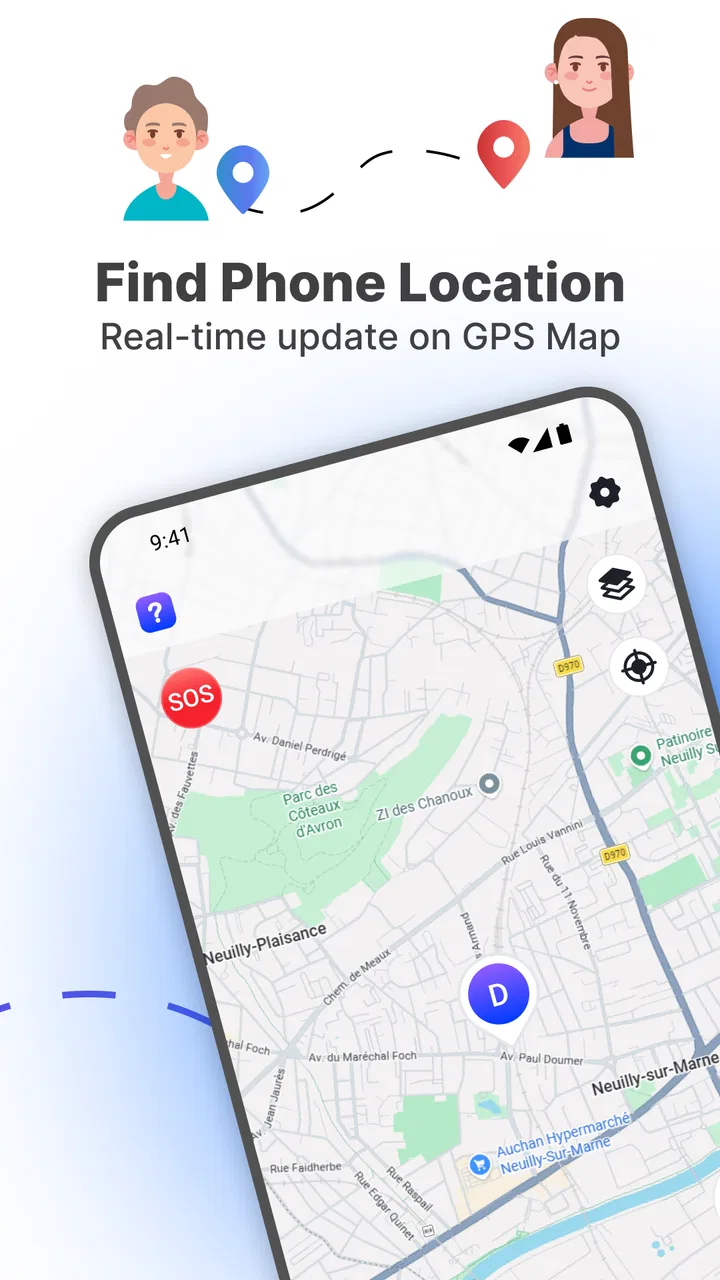
I approached Phone Finder, Location Tracker as a practical parenting tool rather than a general-purpose map app. Its central job is simple: help you check a phone’s location and see it on a GPS map. That narrow focus can be useful when a family needs a quick way to understand where a device is, but it also means the experience depends heavily on how clearly the app communicates location information and how comfortably each person can use it.
In my view, this is best considered a lightweight family location app for people who want a straightforward starting point. It is free, aimed at Everyone, and developed by LionMen. The app has reached over 50 thousand installs and holds a 4.3 average from around 100 ratings, which suggests that it has found an audience without making it feel like an overwhelming social platform. The current release is version 1.0.2, and it runs on Android 7.0 or later.
How Phone Finder feels when the goal is simply finding a device
The most important strength here is the direct purpose. I do not have to think of it as a full family-management system with calendars, messaging, routines, or a large collection of extra panels. The useful question is much more focused: can I open the app, understand the map, and use the displayed location when I need it?
You May Also Like

 Blood Strike: 2.5 Anniversary
Blood Strike’s Loadouts Turn Every Drop Into a Tactical Gamble
A close look at Blood Strike’s custom loadouts: how fast access to signature weapons reshapes its battle royale rhythm, rewards preparation, and narrows the gap between fights.

 Pandora - Music & Podcasts
Pandora’s Music Is Easy to Start, but Harder to Recover
Pandora’s strength is its low-effort path from a seed to a station. Its weak spot is how much confidence it asks you to place in connection, setup, and quiet recovery.

 8 Ball Pool
 Is Built on Rivalries, Rematches, and Routine
A close look at the rivalries, rematches, shared routines, and unanswered safety questions that turn a quick pool match into a persistent mobile community.

 Samsung Music
’s Quiet Strength Is Playing What You Already Own
Its reach comes less from spectacle than from dependable access to a personal library. That simplicity is both the app’s strongest retention engine and its ceiling.

 AccuWeather: Weather Radar
AccuWeather Review: A Quick, Clear Forecast for Everyday Decisions
For everyday plans, the best forecast is the one you can understand quickly. AccuWeather makes rain timing, radar, and local conditions easy to act on, with a few trade-offs.

 Hill Climb Racing
Why Hill Climb Racing Still Turns Crashes Into One More Run
A tiny car, a bumpy hill and one more upgrade: Hill Climb Racing keeps resurfacing because its simple chaos makes every near-miss feel personal.
More From Our News Desk



That simplicity matters for parents who are not especially comfortable with complicated apps. A location map is a familiar visual model, and the idea of checking a phone’s position is easier to grasp than a dashboard filled with unfamiliar labels. For someone who prefers a small number of clear actions, this approach can feel less tiring than an all-in-one family safety service.
At the same time, a GPS map is not automatically easy for everyone. Maps can contain small labels, dense visual details, changing markers, and information that requires careful interpretation. The app’s usefulness therefore depends not only on whether a location appears, but also on whether the person checking it can distinguish the important element from the surrounding map.
I would start by using it in a calm setting, before relying on it during a stressful moment. Open the map, identify what represents the phone, and decide how you will interpret the displayed position. This small preparation step is valuable because location tools are most likely to be used when a child is late, a family member has taken a different route, or someone is trying to coordinate a pickup.
Readability and navigation for different users
For readers who have good vision and are comfortable with map interfaces, the concept should be approachable. The app’s role is easy to explain to another family member: open it, look at the GPS map, and use the location shown for the phone. That makes it more accessible in the everyday sense of being understandable without a long learning period.
Still, I would not assume that every user will find a map equally readable. Older relatives, people with low vision, and users who are easily overwhelmed by visual information may need more time to identify the relevant marker. A larger phone display can help, as can increasing the device’s text size where the operating system allows it, although that may not enlarge every map element.
One useful habit is to avoid judging the location from a quick glance at a crowded area. I would pause, orient myself using recognizable roads or landmarks, and then compare the marker with the expected route. This is more dependable than treating the first visible position as a precise answer. A map is a visual aid, not a substitute for context.
Navigation also becomes more inclusive when one person sets up a consistent routine for the household. For example, the parent who normally checks the app can explain the same map-reading steps to a grandparent or another caregiver. That reduces the need for each person to learn the interface independently and makes the app more practical in shared-care situations.
My main reservation is that a simple purpose does not guarantee simple navigation. If the interface presents several controls without clear distinction, a user with cognitive or visual difficulties may still hesitate. I would therefore recommend a short practice session rather than handing the app to someone during an urgent pickup or travel situation.
Motor and sensory considerations in daily use
Location checking is usually less demanding than writing messages or managing a large set of family settings, which gives Phone Finder a useful advantage for people who want a limited interaction. A parent may only need to open the app and inspect the map instead of performing a long sequence of tasks.
However, map use often involves tapping small areas, dragging across the screen, and distinguishing a marker from nearby details. Those actions can be uncomfortable for someone with tremors, limited dexterity, or difficulty making precise touches. I would use the largest practical screen available and avoid expecting a user with motor limitations to repeatedly zoom, pan, and select tiny controls under pressure.
There is also a sensory side to the experience. A map can be visually busy, especially when roads, labels, and markers compete for attention. People who are sensitive to clutter may find a quick location check more tiring than the app’s short description suggests. A quieter environment and a deliberate viewing routine can make the task easier, but they do not remove the underlying visual demand.
For users who cannot comfortably rely on visual maps, this app may not be the best primary solution. I would not choose it as the only method for a family member who needs spoken guidance, very large visual targets, or a nonvisual way to understand a phone’s position. A service with stronger device-level accessibility support or a workflow built around voice and larger controls could be a better fit in that situation.
Parents should also think about who is expected to use the app. If only one caregiver checks the location and that person is comfortable with maps, the motor and sensory demands may be manageable. If several relatives need to use it, the least comfortable user should guide the decision. A tool can be convenient for one person and frustrating for another without either reaction being unreasonable.
Situational access: when a location map helps and when it does not
The most realistic use case I can see is a child travelling home from school or an activity while a parent is preparing to meet them. Instead of repeatedly calling, the parent can check the phone’s displayed position and get a sense of whether the child is still moving along the expected route. That can reduce unnecessary interruptions, particularly when the child cannot answer immediately.
Another useful situation is shared caregiving. A grandparent may be collecting a child, while the parent remains at work. A location view can give the parent a common reference point during coordination, provided everyone understands what the map is showing and uses it respectfully. This is especially helpful when the family wants a focused location check rather than a large collection of monitoring tools.
The app may also suit adults who carry more than one phone and occasionally need to identify where a device was left. In that case, the value is not about supervising a child but about reducing the time spent searching. The same map-based idea can support a household that wants a simple way to check a phone’s position without adopting a broader family platform.
Accessibility in real life is affected by context. A person may use the app comfortably at home but struggle to read a map in bright sunlight, while walking, or during a noisy pickup. Someone with limited concentration may understand the screen during practice but find it harder when worried about a late child. I would treat the app as one part of a plan, not as the only communication method.
That means agreeing on ordinary backup habits: a child should know how to contact a caregiver, and a caregiver should know what to do if the map does not answer the practical question. Phone Finder can support coordination, but it should not replace sensible family arrangements or direct communication when those are available.
What the app does not solve by itself
The biggest limitation is the difference between seeing a location and understanding a situation. A marker can tell me where a phone is represented on the map, but it cannot explain why the device is there, whether the person carrying it is safe, or whether the displayed position matches the person’s current circumstances. I would never use a map alone as proof that everything is fine.
There is also a privacy and trust issue inherent in any parenting location tool. Families should discuss who is allowed to check a phone and when. Children and teenagers are more likely to accept monitoring when the purpose is explained clearly and the expectations are consistent. The app may be technically simple, but the family agreement around it is just as important as the map itself.
Another barrier is suitability across devices and households. The minimum operating system is Android 7.0, so a very old Android phone may not be a practical candidate. Before planning around the app, I would check the devices involved and test the complete routine rather than assuming that installing it is enough.
I would also avoid treating the 4.3 average as a guarantee that it will suit every family. Around 100 ratings is useful context, but individual needs vary widely, especially when vision, dexterity, reading confidence, or stress are involved. The right test is whether the people who actually need the map can use it comfortably and interpret it correctly.
Phone Finder is not my first choice for someone seeking a complete family safety ecosystem. If you need extensive communication tools, detailed routines, or a broad set of household controls, a more established all-in-one alternative may offer a better match. On the other hand, those larger services can introduce more menus and more cognitive load, so choosing them is not automatically an accessibility improvement.
There is a practical trade-off here: a focused location app can be easier to explain, while a richer service may provide more support around the location itself. I would choose Phone Finder when the family’s main need is a map-based check and the people involved are comfortable with that visual format. I would look elsewhere when the family needs strong nonvisual interaction, extensive assistance, or a more complete safety workflow.
Small habits that make the experience more inclusive
I found that the best way to make a tool like this usable is to design the routine around the person, not around the feature list. First, I would decide who checks the map and what a normal location should look like. That prevents a caregiver from having to learn the app while also trying to interpret an unfamiliar route.
Second, I would create a plain-language explanation for other users. Instead of saying “the tracker shows the device,” I would explain what the marker means, what kind of decision it can support, and when to call the person directly. This is particularly helpful for older relatives or anyone who finds technical language confusing.
Third, I would use the app before an important journey. A short rehearsal can reveal whether the map is readable on a particular phone, whether the user can operate the controls comfortably, and whether the family has unrealistic expectations about precision. Discovering those issues during practice is much better than discovering them when a child is late.
Fourth, I would avoid making one person responsible for every location check. If the primary caregiver has low vision, limited hand movement, or difficulty reading maps, another trusted adult can share the task. Inclusive use often comes from dividing responsibilities sensibly rather than forcing one interface to meet every need.
Finally, I would keep a non-app backup. A phone call, a known meeting point, or a simple check-in agreement can remain useful when a map is difficult to read or does not provide enough context. This is not a criticism unique to Phone Finder; it is a sensible safeguard for any location-based tool.
My inclusive verdict for families considering it
After looking at it through the lens of different abilities and situations, I see Phone Finder as a focused and approachable option for families who want a basic GPS map for checking a phone’s location. Its free price and Everyone age rating lower the barrier to trying it, while LionMen’s compact approach keeps the idea easy to describe. The current version, 1.0.2, is a reasonable starting point for an Android household that meets the operating-system requirement.
The strongest reason to choose it is its focused purpose, not a promise of complete family safety. I would recommend it to a parent who wants a simple location view, can work comfortably with a map, and is willing to establish clear expectations with the people being monitored. It can also help a household share one practical location routine between parents and caregivers.
I would be more cautious for users with significant visual, motor, cognitive, or sensory needs. The map format may create barriers even when the app itself is easy to understand. In those cases, I would compare it with alternatives that offer stronger accessibility options, voice-oriented workflows, or more flexible ways to communicate location information.
My final advice is to test it with the actual people who will depend on it. Check whether they can identify the important map element, operate the screen without strain, and explain what the displayed position means. If those steps feel natural, Phone Finder can be a useful, low-cost addition to a family’s routine. If they do not, a different tool—or a combination of direct communication and a more accessible service—will be the more responsible choice.
FAQs for Phone Finder, Location Tracker
01How accurate is Phone Finder, Location Tracker in locating my device?
Phone Finder, Location Tracker offers highly accurate location tracking using GPS, Wi-Fi, and cellular networks. However, the accuracy can vary based on factors like signal strength, environmental conditions, and device settings. In optimal conditions, it can pinpoint your device within a few meters, making it reliable for finding lost phones.
02Is my privacy protected when using Phone Finder, Location Tracker?
Yes, your privacy is a top priority. Phone Finder, Location Tracker uses secure encryption to protect your data. It only shares location information with authorized users and never stores personal information without consent. You can manage who has access to your location through the app settings.
03Can I use Phone Finder, Location Tracker on multiple devices?
Absolutely! Phone Finder, Location Tracker supports tracking multiple devices from a single account. You can easily add and manage devices through the app’s user-friendly interface, allowing you to keep track of all your gadgets and family members’ devices in one place.
04What if my phone is turned off or has no signal?
If your phone is turned off or lacks a signal, Phone Finder, Location Tracker will display the last known location. Once the device is powered back on or regains connectivity, it will update the location. For enhanced tracking, set up notifications for when the device comes back online.
05Does Phone Finder, Location Tracker drain the battery quickly?
Phone Finder, Location Tracker is designed to minimize battery consumption. It uses smart algorithms to optimize GPS and network usage, ensuring minimal impact on battery life. However, like any location-based service, prolonged use may slightly increase battery usage, so regular monitoring is advised.
Pros
- Accurate location tracking in real-time.
- User-friendly interface for easy navigation.
- Low battery consumption during operation.
- Customizable alerts for location changes.
- Supports multiple devices on one account.
Cons
- Requires constant internet connection.
- Privacy concerns with location data.
- Limited features in free version.
- Notifications can be delayed at times.
- May drain battery faster on older devices.

Phone Finder, Location Tracker
Gallery